Overview
RLV stands for "Restrained Love Viewer" which is a viewer based on the Linden Labs viewer except that it has added functionalities that allows scripted objects to control objects you wear, how your viewer behaves, and how you can access a special folder in your inventory.
More commonly RLV refers to the set of added functionalities that has been published and added to most other viewers with the exception of the Linden Labs viewer.
Within Bloodhunt RLV allows for a more controlled environment in order to offer a better experience by preventing the use of some third-party HUDs considered as griefing tools or systems providing advantages over other players.
Enabling RLV in Firestorm
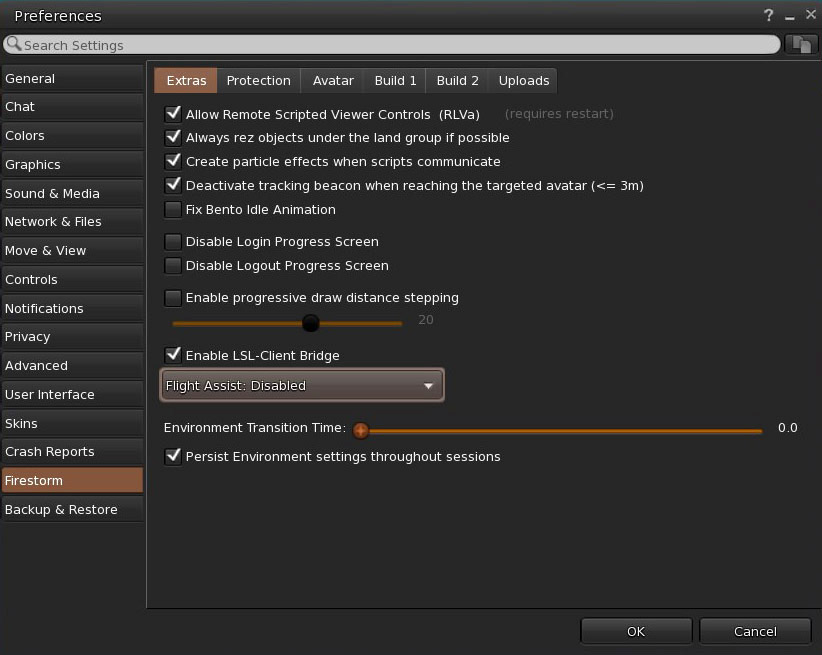
To enable RLV in the Firestorm Viewer, go to your viewer preferences (Ctrl+P) > Firestorm (on the left panel) > General (on the top panel), then check the box that reads, "Allow Remote Scripted Viewer Controls (RLVa). Finally, click on OK. You will need to restart the viewer for this choice to take effect.