Overview
This feature allows you to quickly attach your equipment that previously have been assigned in one of the RLV folders.
In order to use it, make sure you have RLV turned on in your viewer then locate the #RLV folder in your inventory.
If the #RLV folder doesn\'t exist then create it.
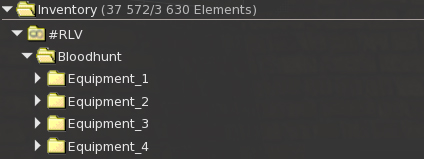
Inside the #RLV folder create a folder named Bloodhunt, this will contain equipment related to the game.
Inside the Bloodhunt folder, create Equipment folders and rename them going from 1 to 4 such as: Equipment_1,Equipment_2,Equipment_3,Equipment_4
Inside each equipment folder must be one single equipment, the rule is one item per folder.
The items that you put in there can be anything you would like to attach, it doesn\'t matter if it is a sword, hatchet or anything else.